Sunday, June 1, 2014

Persuasive Writing in Kindergarten

I know what you are thinking, “What? Persuasive Writing in Kindergarten?” This was a first for me too. I was a little skeptical, but at the end of the unit I found myself enjoying it and excited to teach persuasive writing. The students' learning of this topic was impressive.

With the new Common Core Standards, Kindergarten Writing is much more than writing letters, writing their name, drawing a picture, or writing a sentence. This year, we have wrote true stories, narratives, and how-to books. Our last writing unit is Persuasive Writing. Once Spring Break passed, it was time to get started on our Persuasive Unit.

Here is how I organized my weekly lessons:

Week 1: Discussion on ‘What is persuading?’ Then, I read The Lorax. We talked about convincing people to do things or buy things. What should you tell them? What can you do? The students tried their first attempt at this and we continued this practice through the week. 


Week 2: Earth Day happened to fall during this week. We discussed taking care of our Earth and what to do when you see someone being wasteful and littering. The students wrote posters and notes telling others to take care of our world and what they should do instead of littering. We continued this practice throughout the week. 


Week 3: We moved to writing letters to others. I explained that writing a letter is a good way to convince people to do something. I used an example of mail I had received trying to get me to donate money. I also read, Click Clack Moo, Cows that Type. The students were motivated and excited to get writing. (They finally understood the words, ‘convince’ and ‘persuade’.) They really enjoyed writing letters to others. They still write letters when they have free time. :) 

 
Week 4 (final week of unit): I started the week by reading, I Wanna Iguana. In this story the little boy, uses letter writing to convince his mom to get him a pet iguana. The pictures and humor are very engaging; it became an instant classroom favorite. The students then wrote their final pieces. I told the students that their writing had to explain exactly what they were asking for and why they wanted it or deserved it. Each student made a poster to illustrate his or her writing.


In the Final Presentations, each student presented their writing as a ‘commercial’. I video recorded each student with a PowerPoint slide behind them illustrating what they were asking for. I emailed these to their families. (Some students even convinced their parents and got what they asked for!)

Overall, this unit was a lot of fun. I know my students understood and were excited to write persuasive pieces (many high school students are not excited for such a task!).  I learned a lot and am excited to do this unit again next year!


Monday, May 12, 2014

Mother's Day Gifts


This year I wanted to change what I have done in the past with my students for their Mothers Day gift. It took me a while, but I think this year turned out to be very special. :)

1.    I had each student write about his or her mom


2.    After, on the other side of their paper, each student wrote why they loved their mom. 


3.    I recorded each student reading why they loved their mom using Audioboo. This website is very user friendly. Each student read what they wrote while I was recording. Then, I saved the recording to my account. When you login you can see all the recordings and make a specific QR code from the website. Super easy and very cute!

4.    And finally, the students planted his or her own Petunia for their mother. (What mom doesn’t love a pretty pink flower?!)


Happy Mother’s Day!

Wednesday, April 16, 2014

Math Centers

 
Every Monday to Thursday in my classroom students participate in Math Centers. I have finally figured out a way to manage and feel like students are learning from the centers! 

Here is how it works…The students are put in four different groups. These groups may change as their skill levels change. Each day they move to a different table to complete an activity, project, game, or use one of the five classroom ipads.  I change the centers based on weekly math lessons, a newer skill that may be more challenging, and any concepts that I want the students to have more practice with.  I also have one table that is with my paraeducator. She is able to work with the small group directly on various challenging math skills. I try to keep the activities engaging, independent (so I am able to spend my time working one-on-one with struggling students), and purposeful. 

This week math games were played. I was impressed with my student’s ability to take turns and play fair! (I can say that some adults are not able to do this!)


Check out our Math Center Activities from this week!

Two dice addition—flip over the numbered bottle cap of the sum from the dice.


Addition/Subtraction Game—roll a die and add or subtract the number of chips to fill the board.


App on iPads called Animal Math (see previous post)
Students were playing ‘Cordelia’ to practice skip counting. 


Subtraction Count—roll & subtract, whoever had the lower number gets a chip.

Sunday, March 23, 2014

Fun with the ‘Show Me’ app….


Our tech team showed me how to use the ‘Show Me’ app back in December. I sat there thinking that I would never be able to utilize it because it was too hard for Kindergarteners.
Boy, was I wrong!!

In our Language Arts Reading Street Unit, this week’s book was the well-known story of Goldilocks and the Three Bears. I got the courage and decided to try this app. I put the students into groups of four. Each group was in charge of retelling a part of the story. This app records what the students draw and say into the microphone. When they are finished they save the project and when every group had completed their retelling, I was able to use the reflector to put their stories on my computer. The class saw Goldilocks and the Three Bears retold by their peers.
What fun we had learning!!

Here are some pictures on their collaboration process: 


Sunday, March 9, 2014

A New Math App...

I love finding apps that are fun, interactive, and easy to use for my students (and me). This app: Animal Math is just that! Each day in Math Centers, my students are working on different skills. I try to have one center where the students use the Ipads. We have played many different games and used the Everyday Math website. I was looking for something else to keep my students involved in Math skills. This app combines number recognition, patterns, counting, addition, subtraction, and many other math skills. The colors and pictures are fun and exciting. All my students were engaged and working hard when they used the app. 
Check it out Happy Counting!  


Wednesday, February 12, 2014

Sight Word Scanning


This has been an exciting week! I tried something new, which made me a little nervous, but I am so happy with the results. :)

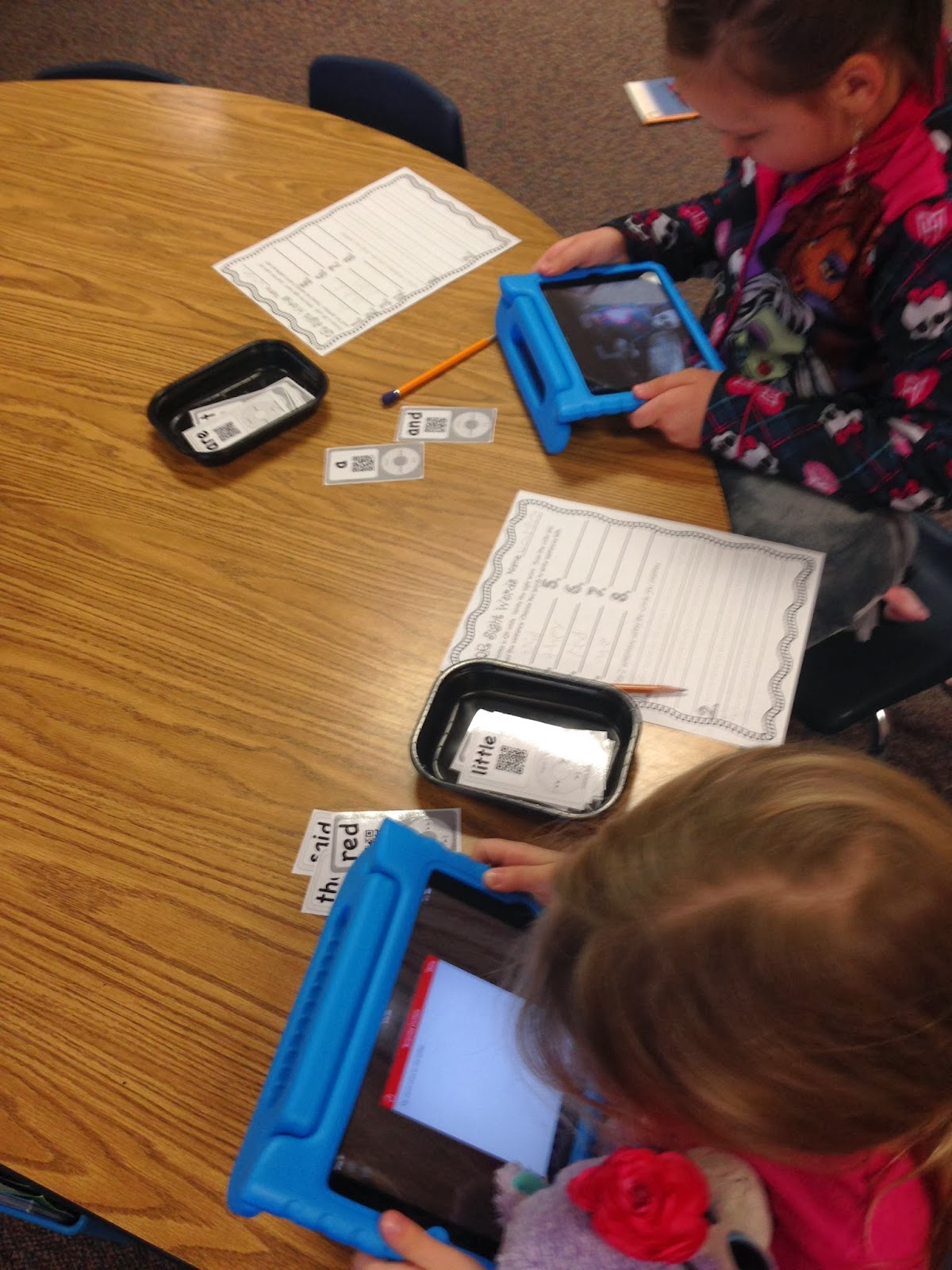
Sight word QR scanning! It was really simple and very effective for my students. I found these QR codes and printed and laminated them. During word work, the students used an iPad to scan the QR code. After scanning, a sentence popped up, which they had to read. I also had the students write the sight word down for extended practice. Then, they continued scanning the different QR codes, repeating the process. 

I was so happy all my students were able to complete the activity and really enjoyed scanning the sight words. What a great learning experience!  


Sunday, February 2, 2014

Schools of Rock!

Friday was our district's 5th annual Schools of Rock Show. This is where each school preforms a dance to compete with all other schools in the district. It can get competitive, but it is all for a good cause. This year we had a lot of fun! It was clear that everyone worked really hard and brought their best.

Here is Pleasant Ridge's School of Rock performance. Enjoy! :)